
AI Code Assistant Performance Scoring Framework
Overview
This scorecard provides a comprehensive evaluation framework for AI code assistants, measuring performance across four key domains: Intelligence, Acceleration, Experience, and Value. Each domain contains specific criteria rated on a scale of 0-10 points, creating a total potential score of 100 points.
mindmap
  root((Performance Scorecard))
    Intelligence["Intelligence (30pts)"]
        Context_Awareness["Context Awareness (10pts)"]
        Output_Quality["Output Quality (10pts)"]
        Autonomy["Autonomy (10pts)"]
    Acceleration["Acceleration (30pts)"]
        Iteration_Size["Iteration Size (10pts)"]
        Iteration_Speed["Iteration Speed (10pts)"]
        Capabilities["Capabilities (10pts)"]
    Experience["Experience (30pts)"]
        Flexibility["Flexibility (10pts)"]
        Ease_of_Use["Ease of Use (10pts)"]
        Reliability["Reliability (10pts)"]
    Value["Value (10pts)"]
        Cost_Benefit["Cost-Benefit (10pts)"]
Scoring Framework
Each dimension consists of multiple criteria, with each criterion scored from 0-10 points:
| Score Range | Performance Level | Description |
|---|---|---|
| 8-10 | Exceptional | Exceeds requirements with exceptional performance |
| 6-7 | Good | Meets all requirements with solid performance |
| 4-5 | Fair | Meets basic requirements with limitations |
| 0-3 | Poor | Falls short of basic requirements |
1. Intelligence (30 points)
Intelligence evaluates how effectively the AI understands context, generates high-quality output, and operates with minimal supervision.
1.1 Context Awareness (10 points)
graph LR
    subgraph Intelligence: Context Awareness
    Poor[Poor: 0-3] --> Fair[Fair: 4-5] --> Good[Good: 6-7] --> Exceptional[Exceptional: 8-10]
    end

    style Poor fill:#ffcccc,stroke:#ff0000
    style Fair fill:#ffffcc,stroke:#ffcc00
    style Good fill:#ccffcc,stroke:#00cc00
    style Exceptional fill:#ccffff,stroke:#00ccff

    Poor --- Poor_Desc[Has basic grasp of code context.<br>Frequently needs reminders.<br>Limited awareness of dependencies.]
    Fair --- Fair_Desc[Retains core context in discussions.<br>Grasps nearby code details.<br>Needs occasional updates.]
    Good --- Good_Desc[Maintains continuity across interactions.<br>Retrieves relevant details proactively.<br>Recognizes when input is needed.]
    Exceptional --- Ex_Desc[Understands project goals, architecture in detail.<br>Anticipates next steps.<br>Retains context effortlessly.]
1.2 Output Quality (10 points)
graph LR
    subgraph Intelligence: Output Quality
    Poor[Poor: 0-3] --> Fair[Fair: 4-5] --> Good[Good: 6-7] --> Exceptional[Exceptional: 8-10]
    end

    style Poor fill:#ffcccc,stroke:#ff0000
    style Fair fill:#ffffcc,stroke:#ffcc00
    style Good fill:#ccffcc,stroke:#00cc00
    style Exceptional fill:#ccffff,stroke:#00ccff

    Poor --- Poor_Desc[Partially meets requirements.<br>Basic implementation.<br>Missing error handling.]
    Fair --- Fair_Desc[Meets most requirements.<br>Lacks comprehensive error handling.<br>Needs refinement for production.]
    Good --- Good_Desc[Meets all requirements.<br>Clean, well-organized code.<br>Handles errors effectively.]
    Exceptional --- Ex_Desc[Exceeds requirements.<br>Production-ready code.<br>Optimized for performance.]
1.3 Autonomy (10 points)
graph LR
    subgraph Intelligence: Autonomy
    Poor[Poor: 0-3] --> Fair[Fair: 4-5] --> Good[Good: 6-7] --> Exceptional[Exceptional: 8-10]
    end

    style Poor fill:#ffcccc,stroke:#ff0000
    style Fair fill:#ffffcc,stroke:#ffcc00
    style Good fill:#ccffcc,stroke:#00cc00
    style Exceptional fill:#ccffff,stroke:#00ccff

    Poor --- Poor_Desc[Completes tasks with guidance.<br>Limited in making decisions.<br>Minimal problem-solving ability.]
    Fair --- Fair_Desc[Completes tasks with some autonomy.<br>Needs guidance for major decisions.<br>May struggle without help.]
    Good --- Good_Desc[Breaks problems into manageable parts.<br>Drives progress with minimal supervision.<br>Makes sound technical decisions.]
    Exceptional --- Ex_Desc[Juggles multiple tracks seamlessly.<br>Self-corrects and iterates independently.<br>Makes informed choices proactively.]
2. Acceleration (30 points)
Acceleration measures how the AI enhances developer productivity through code generation capabilities, response time, and feature breadth.
2.1 Iteration Size (10 points)
graph LR
    subgraph Acceleration: Iteration Size
    Poor[Poor: 0-3] --> Fair[Fair: 4-5] --> Good[Good: 6-7] --> Exceptional[Exceptional: 8-10]
    end

    style Poor fill:#ffcccc,stroke:#ff0000
    style Fair fill:#ffffcc,stroke:#ffcc00
    style Good fill:#ccffcc,stroke:#00cc00
    style Exceptional fill:#ccffff,stroke:#00ccff

    Poor --- Poor_Desc[Code completions and suggestions.<br>Single-line changes.<br>Struggles with multi-part changes.]
    Fair --- Fair_Desc[Complete functions or classes.<br>Single-file changes.<br>Updates direct dependencies.]
    Good --- Good_Desc[Complete features across files.<br>Manages related dependencies.<br>Handles component-level changes.]
    Exceptional --- Ex_Desc[Production-ready applications.<br>Complex features across full stack.<br>Manages multiple components.]
2.2 Iteration Speed (10 points)
graph LR
    subgraph Acceleration: Iteration Speed
    Poor[Poor: 0-3] --> Fair[Fair: 4-5] --> Good[Good: 6-7] --> Exceptional[Exceptional: 8-10]
    end

    style Poor fill:#ffcccc,stroke:#ff0000
    style Fair fill:#ffffcc,stroke:#ffcc00
    style Good fill:#ccffcc,stroke:#00cc00
    style Exceptional fill:#ccffff,stroke:#00ccff

    Poor --- Poor_Desc[Noticeable latency for simple changes.<br>Long processing for moderate tasks.<br>Inefficient feedback process.]
    Fair --- Fair_Desc[Reasonable times for basic tasks.<br>Some delay with larger changes.<br>Performance drops with complexity.]
    Good --- Good_Desc[Quick responses for most tasks.<br>Minimal wait time between iterations.<br>Handles multiple requests efficiently.]
    Exceptional --- Ex_Desc[Instant response regardless of complexity.<br>Zero-latency changes and validation.<br>Real-time updates and feedback.]
2.3 Capabilities (10 points)
graph LR
    subgraph Acceleration: Capabilities
    Poor[Poor: 0-3] --> Fair[Fair: 4-5] --> Good[Good: 6-7] --> Exceptional[Exceptional: 8-10]
    end

    style Poor fill:#ffcccc,stroke:#ff0000
    style Fair fill:#ffffcc,stroke:#ffcc00
    style Good fill:#ccffcc,stroke:#00cc00
    style Exceptional fill:#ccffff,stroke:#00ccff

    Poor --- Poor_Desc[Core coding functions only.<br>Single input method.<br>Manual setup and deployment.]
    Fair --- Fair_Desc[Code generation focus.<br>Basic input methods.<br>Limited automation.]
    Good --- Good_Desc[Key development phases.<br>Multiple input methods.<br>Built-in deployment functionality.]
    Exceptional --- Ex_Desc[Multi-modal inputs.<br>Full development lifecycle.<br>One-click deployment with infrastructure.]
3. Experience (30 points)
Experience evaluates the user interaction quality, including flexibility across environments, ease of use, and operational reliability.
3.1 Flexibility (10 points)
graph LR
    subgraph Experience: Flexibility
    Poor[Poor: 0-3] --> Fair[Fair: 4-5] --> Good[Good: 6-7] --> Exceptional[Exceptional: 8-10]
    end

    style Poor fill:#ffcccc,stroke:#ff0000
    style Fair fill:#ffffcc,stroke:#ffcc00
    style Good fill:#ccffcc,stroke:#00cc00
    style Exceptional fill:#ccffff,stroke:#00ccff

    Poor --- Poor_Desc[Limited language support.<br>Minimal extensibility.<br>Restricted code portability.]
    Fair --- Fair_Desc[Major languages only.<br>Environment limitations.<br>Limited code portability.]
    Good --- Good_Desc[Major languages and frameworks.<br>Good extensions selection.<br>Easy code export.]
    Exceptional --- Ex_Desc[Comprehensive ecosystem support.<br>Works across all environments.<br>No vendor lock-in.]
3.2 Ease of Use (10 points)
graph LR
    subgraph Experience: Ease of Use
    Poor[Poor: 0-3] --> Fair[Fair: 4-5] --> Good[Good: 6-7] --> Exceptional[Exceptional: 8-10]
    end

    style Poor fill:#ffcccc,stroke:#ff0000
    style Fair fill:#ffffcc,stroke:#ffcc00
    style Good fill:#ccffcc,stroke:#00cc00
    style Exceptional fill:#ccffff,stroke:#00ccff

    Poor --- Poor_Desc[Basic functionality lacks intuitiveness.<br>Steep learning curve.<br>Limited flexibility.]
    Fair --- Fair_Desc[Works for specific user groups.<br>May require technical background.<br>Interface may be overwhelming.]
    Good --- Good_Desc[Low barrier for new users.<br>Logical interface.<br>Balanced features.]
    Exceptional --- Ex_Desc[No barriers for beginners.<br>Intuitive with natural guidance.<br>Advanced features without sacrificing simplicity.]
3.3 Reliability (10 points)
graph LR
    subgraph Experience: Reliability
    Poor[Poor: 0-3] --> Fair[Fair: 4-5] --> Good[Good: 6-7] --> Exceptional[Exceptional: 8-10]
    end

    style Poor fill:#ffcccc,stroke:#ff0000
    style Fair fill:#ffffcc,stroke:#ffcc00
    style Good fill:#ccffcc,stroke:#00cc00
    style Exceptional fill:#ccffff,stroke:#00ccff

    Poor --- Poor_Desc[Frequent issues and instability.<br>Poor error handling.<br>Limited uptime.]
    Fair --- Fair_Desc[Generally solid but variable.<br>Occasional issues.<br>Basic error handling.]
    Good --- Good_Desc[Consistent results most of the time.<br>Minimal disruptions.<br>Clear error messages.]
    Exceptional --- Ex_Desc[Predictable results in all scenarios.<br>Near-perfect uptime.<br>Seamless handling of interruptions.]
4. Value (10 points)
Value assesses the overall cost-benefit ratio, pricing structure, and return on investment.
graph LR
    subgraph Value Assessment
    Poor[Poor: 0-3] --> Fair[Fair: 4-5] --> Good[Good: 6-7] --> Exceptional[Exceptional: 8-10]
    end

    style Poor fill:#ffcccc,stroke:#ff0000
    style Fair fill:#ffffcc,stroke:#ffcc00
    style Good fill:#ccffcc,stroke:#00cc00
    style Exceptional fill:#ccffff,stroke:#00ccff

    Poor --- Poor_Desc[Basic functionality at reasonable cost.<br>Limited lower-tier features.<br>Lacks transparency.]
    Fair --- Fair_Desc[Moderate value.<br>Limited free tier.<br>Features restricted to higher tiers.]
    Good --- Good_Desc[Fair pricing.<br>Generous free tier.<br>Straightforward model.]
    Exceptional --- Ex_Desc[Exceptional value.<br>Robust free tier.<br>Transparent pricing, no hidden fees.]
Evaluation Process
To effectively evaluate AI code assistants using this scorecard:
- Define Requirements: Identify organizational priorities and specific use cases
- Assign Weights: Adjust the importance of each dimension based on team needs
- Conduct Assessment: Score each AI tool across all dimensions
- Calculate Final Score: Sum weighted scores across all criteria
- Compare Results: Analyze strengths and weaknesses of each tool
AI Code Assistant Comparison
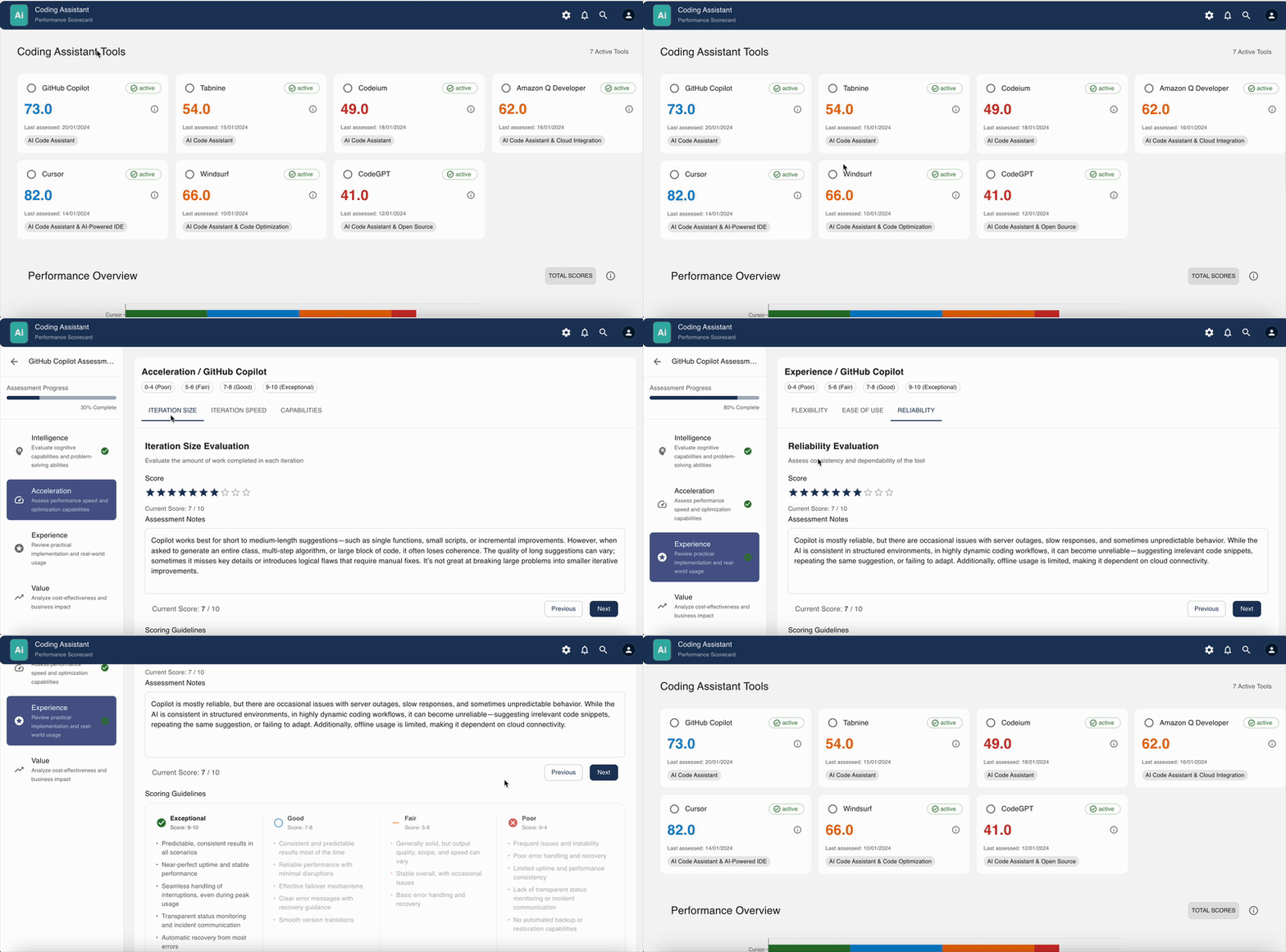
This scorecard can be applied to evaluate the following AI code assistants:
- GitHub Copilot
- Tabnine
- Codeium
- Amazon Q Developer
- Cursor
- Windsurf
- CodeGPT
- Google Code Assist
Conclusion
This performance scorecard provides a structured approach to evaluating AI code assistants across multiple dimensions. By systematically assessing each tool against these criteria, organizations can select the solution that best aligns with their specific development needs and priorities.
The highest-performing AI code assistants will demonstrate strengths across all four domains—Intelligence, Acceleration, Experience, and Value—though the relative importance of each domain may vary depending on your organization’s specific requirements and constraints.